Posts

Showing posts with the label step-by-step

EasyTax- Income Tax Return Filing- ആദായ നികുതി- Step-by-Step guide

Image
ആദായ നികുതി സോഫ്റ്റ് വെയറായ EASY TAX ഉപയോഗിച്ച് ഗവൺമെൻറ് ജീവനക്കാർക്ക് സ്വയം ആദായ നികുതി ഫയൽ ചെയ്യാം.  ഇതിനു വേണ്ടി തയ്യാറാക്കിയ സോഫ്റ്റ് വെയറാണ് EASY TAX - ഈസി ടാക്സ്.  മൈക്രോസോഫ്റ്റിന്‍റെ ആക്സസ് ( Microsoft Access) സോഫ്റ്റ് വെയറിലാണ് ഈസി ടാക്സ് സോഫ്റ്റ് വെയർ തയ്യാറാക്കിയിട്ടുള്ളത്.  പേരു പോലെ എളുപ്പത്തിൽ ആദായ നികുതി റിട്ടേൺ ഫയൽ ചെയ്യാനുള്ള സൗകര്യം  EASY TAX  തരുന്നുണ്ട്.  താഴെ പറയുന്ന കാര്യങ്ങൾ ശ്രദ്ധയോടെ ചെയ്യുക. 32Bit, 64Bit എന്നിങ്ങനെ രണ്ട് തരത്തിലാണ്  EASY TAX ഉള്ളത്.    മൈക്രോസോഫ്റ്റ് ഓഫീസ് ( Word, Excel, Powerpoint, Access) എതെങ്കിലും വേർഷൻ  കംപ്യൂട്ടറിൽ നിർബന്ധമായും   ഉണ്ടായിരിക്കണം.   EASY TAX  64 BIT ആണ്  ഡൗണ്‍ലോഡ് ചെയ്യുന്നതെങ്കിൽ   മൈക്രോസോഫ്റ്റ് ആക്സസിന്‍റെ 2010 വേര്‍ഷനോ അതിന് ശേഷമുള്ള വേര്‍ഷനോ ആണ് വേണ്ടത്.   ഇനി,  EASY TAX  32-BIT ആണ്  ഡൗണ്‍ലോഡ് ചെയ്യുന്നതെങ്കിൽ   മൈക്രോസോഫ്റ്റ് ആക്സസിന്‍റെ  2007-ഉം അതിന്  മുമ്പെ ഉള്ള   വേര്‍ഷനോ  ആണ് വേണ്ടത്. ...

PageMaker: Masking

Image
Masking means cover or frame the object/image with a shape, through which you can see the object. For this you require one image and a polygon shape. Now, follow below steps. Open Adobe PageMaker and click File menu then New which opens the Document Setup window. Now, select PageSize as Letter and Orientation Wide. Check the image below to set the remaining fields. Click Ok to proceed to next Add the picture into the document you just created. You can select image through picture palette or by going to menu and select File->Place (or Ctrl+D) and select the picture you like and drag in your document [In this method when you select an image your mouse pointer will change then click drag your mouse pointer] Click to learn the basics of PageMaker Now select Polygon tool from the tool box and select Element from menu and click Polygon settings . In this window you can change the sides and radius of your polygon. Refer below image: In Polygon settings window Number of Sides...

PageMaker: Designing NewsPaper

Image
A newspaper is a printed media published daily or weekely in a folded, unstapled format containing information about current events, along with covering various fields such as, business,sports, arts, politics, weather forecasts, etc. It also includes fields such as birthday, obituaries, advertisements, opinions etc. Newspaper comes in different sizes(WxH) such as Broadsheet, Berliner and Tabloid. Broadsheet Which has the measure of 23.5" x 29.5" or 13.5" x 21.5" Berliner Dimension of this type is 12.4" x 18.5" Tabloid Which has the measure of 11.0" x 16.9" Compact Which has the measure of 10.5" x 13.5" Almost all major newspapers in India are broadsheets. Tabloids are mostly found in small-circulation local or rural papers. Let's get started by designing broadsheet size, 13.5" x 21.5", newspaper. Open Page maker and choose File from menu then New and fill the field in the Document set-up window ****Check th...

PageMaker: Designing a brochure

Image
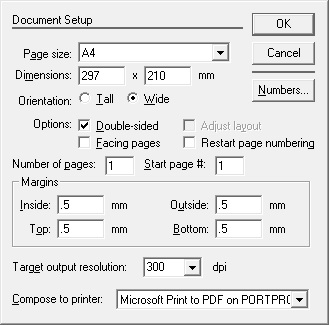
Steps to create a brochure. 1)Draw the layout Open PageMaker, in File menu select New and setup a document of page size A4 with Orientation: wide, margins: 0.5mm and target output resolution:300 dpi.

PageMaker: Designing an invoice

Image
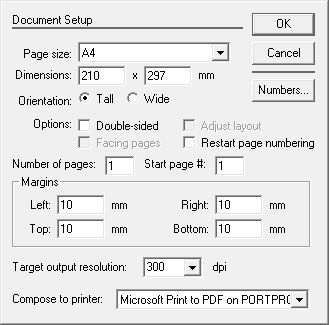
Three simple steps to create a invoice page. 1)Draw the layout Open PageMaker, in File menu select New and setup a document of page size A4 with Orientation: Tall, margins: 10mm and target output resolution:300 dpi. Now, draw five rectangle box with following dimension (W x H) 187mm x 36mm, 187mm x 37 mm, 187mm x103.5mm, 67.5mm x 35.5mm, 187 mm x 29.7mm.

Interesting Android

Image
Google's Android Operating System is the major platform for almost every smartphone. It is said that 9 out of 10 smartphone shipped are runs on Android. Open source, customization, unlimited and unrestricted availability of applications makes Android OS favorite for manufacturers,developers and user. For Android OS, each version has given a specific name( usually names of dessert items), ordered alphabetically. After Android 1.0 and 1.2 which doesn't have any name Google released the revised version of last OS as Android 1.5 with code name Cupcake.[ Read full list of Android version ]. Current versions are Marshmallow(Android 6.0)and Nougat(Android 7.0). Point is that, everything from the naming to usage, Android phone has something interesting for its user.Here is one. Android Operating Systems such as Lollipop(Android 5.0), Marshmallow comes with a game which is hidden from the user. But, you can have the game by