Posts

Showing posts with the label how

PageMaker: Designing an invoice
Image
Three simple steps to create a invoice page. 1)Draw the layout Open PageMaker, in File menu select New and setup a document of page size A4 with Orientation: Tall, margins: 10mm and target output resolution:300 dpi. Now, draw five rectangle box with following dimension (W x H) 187mm x 36mm, 187mm x 37 mm, 187mm x103.5mm, 67.5mm x 35.5mm, 187 mm x 29.7mm.
PageMaker: Making simple visiting card step-by-step

Image
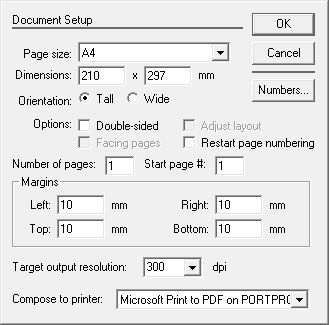
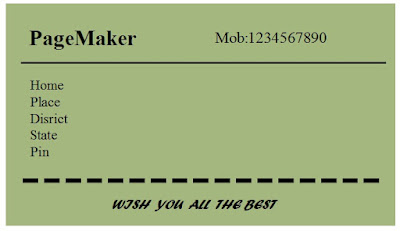
In this post you will learn how to create simple visiting card using Adobe PageMaker 7.0. Below is the image of a simple visiting card you are going to try. SanDisk Extreme SD UHS I 64GB Card for 4K Video for DSLR and Mirrorless Cameras 170MB/s Read & 80MB/s Write First, open the PageMaker application. Close the Templates window, which opens initially on startup of PageMaker, Now click on File menu and select New . A Document setup window opens,make the fields of Document Setup as seen in the image below and click OK Now select rectangle box tool from Tool box and draw a rectangle.

Refresh webpage automatically/periodically

Image
To refresh/reload your webpage automatically,or refreshing/reloading page periodically, use the &ltmeta&gt tag in your html document. What is <meta> tag actually...? The &ltmeta&gt tag provides metadata about your HTML document, such as page description, keywords, author of the document, last modified etc. This data are used by browser, search engines, other web services. In certain cases the webserver uses theses valuesto further define the document content type to the browser. It is a machine parsable tag and will not be displayed by browser on webpages. This tag always put between &lthead&gt...&lt/head&gt . The attributes of this tag are, content,http-equive,scheme,name and charset . Browser uses the metadata - how to

Pause automatic updates in Windows 10

Image
Microsoft windows 10 automatic updates makes your PC better. It do all the action(downloading updates) in background, means you don't have to worry anything about. Windows downloads important updates and install in your system. For this, OS must restart your system. And you have to wait for completion of installation . This, you don't like, if your in the middle of a busy work. And, also that, for downloading updates it use internet connection. If you are online, doing important browsing or watching online video, make worst . To overcome this situation there are, two, option. (1)Schedule the update( only Anniversary Updates ) or (2) using Command to suspend the background process. First method - schedule the update : Open Start->Settings